Victron Nucleo GX: the fast,
stripped-back brain for a modern off-grid system.
Every Victron system has a GX device at its centre — the box that watches everything, talks to VRM, starts the generator and runs your automations. The Nucleo GX, announced in July 2026, is Victron's newest one: in Victron's own words, "a compact, high-performance GX device that offers Ekrano GX-level speed at a lower cost." It gets there by leaving out the ports most installs never wire. Here's what that means, and when we'd choose it over a Cerbo GX or an Ekrano GX.
Designed in Lismore · installed by accredited locals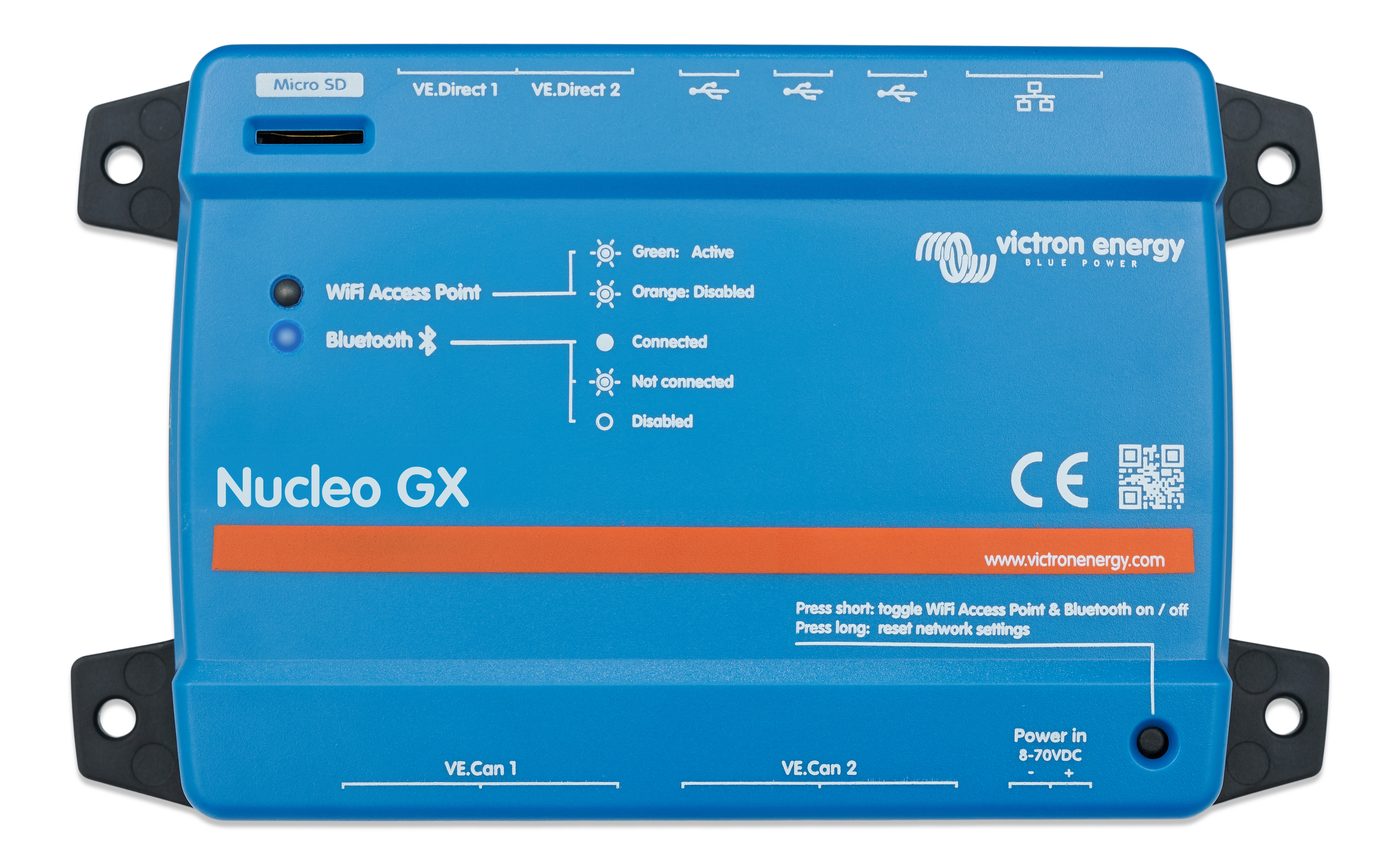
The Nucleo GX. Victron product photography.
What a GX device actually does
A Victron inverter-charger, the solar chargers and the battery each know their own corner of the system. The GX device is the one that knows all of it. It collects every reading, shows the whole system on one screen, uploads it to VRM so you and your installer can see it from anywhere, decides when the generator starts, and — for those who want it — runs custom logic through Node-RED. Choosing the GX device is choosing how well you'll understand and control the system for the next fifteen years. It matters more than its size suggests.
What the Nucleo GX is
Ekrano-level performance
A quad-core processor — the same class as Victron's flagship Ekrano GX, rather than the Cerbo GX's dual core. That shows up as a snappier Remote Console, headroom for Node-RED automations and Dynamic ESS, and room for the growing list of things Venus OS does with every release.
Built for VE.Can systems
Two VE.Can ports (one isolated, one not), two VE.Direct ports with up to 25 VE.Direct devices reachable via USB, three USB-A ports, Ethernet, WiFi and Bluetooth. That is exactly the set the Multi RS family — including the rack-mounted RS19 and HS19 — and managed CAN-bus batteries talk on. Victron calls it "an ideal choice for ESS and off grid installations built around the Multi RS."
What it doesn't have
No VE.Bus port, no HDMI, no relays, no digital inputs, no tank or temperature inputs. Each is added only if you use it: an MK3-USB interface for a MultiPlus or Quattro, a GX I/O Extender 150 for relays and digital inputs, a GX Tank 140 for tank senders, and an Android GX WiFi Display for a screen on the wall. You pay for compute, not for terminals you'd never wire.
In the cabinet, on a DIN rail
78 × 154 × 48 mm, wall or 35 mm DIN-rail mounted, 8–70 V DC supply so it runs straight off a 12, 24 or 48 V battery, rated -20 to +50 °C, IP20 — an indoor, in-the-enclosure device, which is where a GX belongs on an off-grid property anyway.
Nucleo GX vs Cerbo GX vs Ekrano GX
| What matters | Nucleo GX | Cerbo GX (MK2) | Ekrano GX |
|---|---|---|---|
| Processor | Quad core | Dual core | Quad core |
| Display | None built in — Android GX WiFi Display, phone, browser, VRM | None built in — GX Touch 50/70 over HDMI, phone, browser, VRM | 7-inch touchscreen built in |
| VE.Bus (MultiPlus, Quattro) | No — via MK3-USB interface | Yes | Yes (two paralleled sockets) |
| VE.Direct (MPPTs, SmartShunt) | 2 ports, up to 25 devices with USB | 3 ports | 3 ports |
| VE.Can (Multi RS, RS19, HS19, managed batteries) | 2 — one isolated, one non-isolated | 2 — one isolated, one non-isolated | Yes |
| USB | 3 × USB-A | 3 | Yes |
| Relays, digital inputs | No — GX I/O Extender 150 | Yes | Yes |
| Tank and temperature inputs | No — GX Tank 140 | 4 tank, 4 temperature | Yes |
| Ethernet · WiFi · Bluetooth | Yes · Yes · Yes | Yes · Yes · Yes | Yes · Yes · Yes |
| Mounting | Wall or DIN rail, IP20 | Wall or DIN rail | Flush panel, IP54 front |
| Cost position | Lower cost than the Ekrano GX (Victron's words) | The long-standing default | You're paying for the screen |
Nucleo figures are Victron's product page and datasheet. Cerbo and Ekrano rows are from Victron's GX range comparison. Where a count wasn't published we've written "yes" rather than guess.
Why we'd put a Nucleo GX in a new off-grid system
Look at what a modern Victron off-grid build is made of: a Multi RS — or one of the new rack-mounted RS19 or HS19 units — talking VE.Can, a managed lithium rack talking CAN-bus, SmartSolar chargers on VE.Direct, VRM on the owner's phone. Not one of those touches VE.Bus, a relay terminal or a tank sender. On that system a Cerbo GX brings ports nobody wires and a slower processor, and an Ekrano brings a screen the owner reads on their phone anyway. The Nucleo brings the speed, the right ports, and nothing else. That is the honest fit.
The speed is not vanity. Remote Console over VRM is how we support a property from Lismore without a truck; Node-RED is how a system does exactly what a farm asks of it; Dynamic ESS is where grid-connected Victron is heading. All three lean on the processor. The Nucleo gives a 48-volt off-grid home the same headroom as Victron's flagship, in a box that clips onto a DIN rail beside the battery rack.
When we'd still pick a Cerbo or an Ekrano
A Cerbo GX when the system is a MultiPlus or Quattro and you'd rather plug VE.Bus straight in than add an MK3-USB, or when relays, digital inputs and tank or temperature sensors are genuinely part of the design — a generator with a manual-start contact, a water tank you want on the dashboard. An Ekrano GX when the owner wants one screen on the wall that shows the whole property, and is happy to pay for it. A Nucleo GX for the rest — which, for new off-grid builds on the RS family, is most of them.
Three things to know
It's new. Announced July 2026. Victron hardware matures through firmware after launch, and the Nucleo runs the same Venus OS as every other GX, so it inherits every release. Early systems get a dealer who reads the release notes — that's us.
Count your VE.Bus gear first. If a MultiPlus or Quattro is in the system, the MK3-USB interface goes on the parts list from day one. If two or more VE.Bus units run in parallel or three phase, ask us before assuming a Nucleo is the right GX — the Cerbo's native VE.Bus port may be the cleaner answer there.
Generator start still works. The Nucleo's automated generator start/stop is a listed feature; the switching happens through the inverter's own relay or a GX I/O Extender 150 rather than a relay on the GX itself. It's a design detail, not a limitation, once it's drawn correctly.
Which GX belongs in your system?
Tell us what the system is — new build or existing Victron gear, off-grid or hybrid, what you want to see and control. The design names the GX device that fits and says why: Nucleo, Cerbo or Ekrano, with the working shown.
Prefer to talk it through? Call or text 0483 927 257 — Lismore HQ, local voices.
Nucleo GX questions, answered
What is the Victron Nucleo GX?
Victron's newest GX device, announced in July 2026: a compact, quad-core communication centre with Ekrano GX-level speed at a lower cost. It monitors and controls a Victron system, connects it to VRM, runs generator start/stop and automations, and connects up to 25 devices via VE.Direct and USB plus more via VE.Can.
Nucleo GX vs Cerbo GX — what's the difference?
Speed and ports. The Nucleo has a quad-core processor to the Cerbo's dual core, and it leaves out VE.Bus, HDMI, relays, digital inputs and tank or temperature inputs, each of which can be added with an accessory if the design calls for it. The Cerbo keeps all of those built in. For a Multi RS, RS19 or HS19 system on managed batteries, the Nucleo is the better fit; for a MultiPlus or Quattro system that uses relays and sensors, the Cerbo often still is.
Nucleo GX vs Ekrano GX?
Same class of processor. The Ekrano adds a built-in 7-inch touchscreen, VE.Bus, relays and inputs, and a flush-mount case, and costs more. If the owner wants one screen on the wall, the Ekrano earns it; if the phone and VRM are the screen, the Nucleo does the same job for less.
Can a Nucleo GX work with a MultiPlus or Quattro?
Yes, through Victron's MK3-USB interface, since the Nucleo has no VE.Bus port of its own. For a single inverter that is a small addition. For paralleled or three-phase VE.Bus systems, ask — a Cerbo GX's native VE.Bus port may be the cleaner design.
How do I get a screen with a Nucleo GX?
Through VRM on any phone or computer, through a web browser on the local network, or by adding Victron's Android GX WiFi Display for a dedicated screen on the wall. There is no HDMI port, so the GX Touch 50 and 70 used with the Cerbo don't apply.
Which GX device does The Off Grid Shop recommend?
The one the design calls for. New off-grid builds on the Multi RS, RS19 or HS19 with managed batteries: the Nucleo GX. MultiPlus or Quattro systems with relays and sensors in play: the Cerbo GX. A wall screen the owner will actually look at: the Ekrano GX. Read our Victron page for why the monitoring is the reason we back the platform at all.